Sex offender screening, right inside CarePort
Your admissions team opens a referral in CarePort, WellSky or ExtendedCare. An Offendersearch screening panel is already there in the patient header. One click checks the sex-offender registries and shows the answer in place — no second window, no copy-paste, no waiting on a vendor integration.
Works with CarePort · WellSky · ExtendedCare · Ensocare · Aidin.
The one referral you can’t afford to miss
A busy intake day is a hundred referrals and a placement clock. Somewhere in that stream is the resident who should never be admitted to a building full of vulnerable people without your team knowing exactly who they are. Checking each one by hand — opening a separate registry site, retyping the name, reading the result — is the step that quietly gets skipped when the day is full.
A missed registry match is a resident-safety failure and a negligent-admission exposure at the same time. The fix is not another login your coordinators have to remember — it’s a screen that is already there, in the referral, the moment they open it.
A screening panel, seated in the patient header
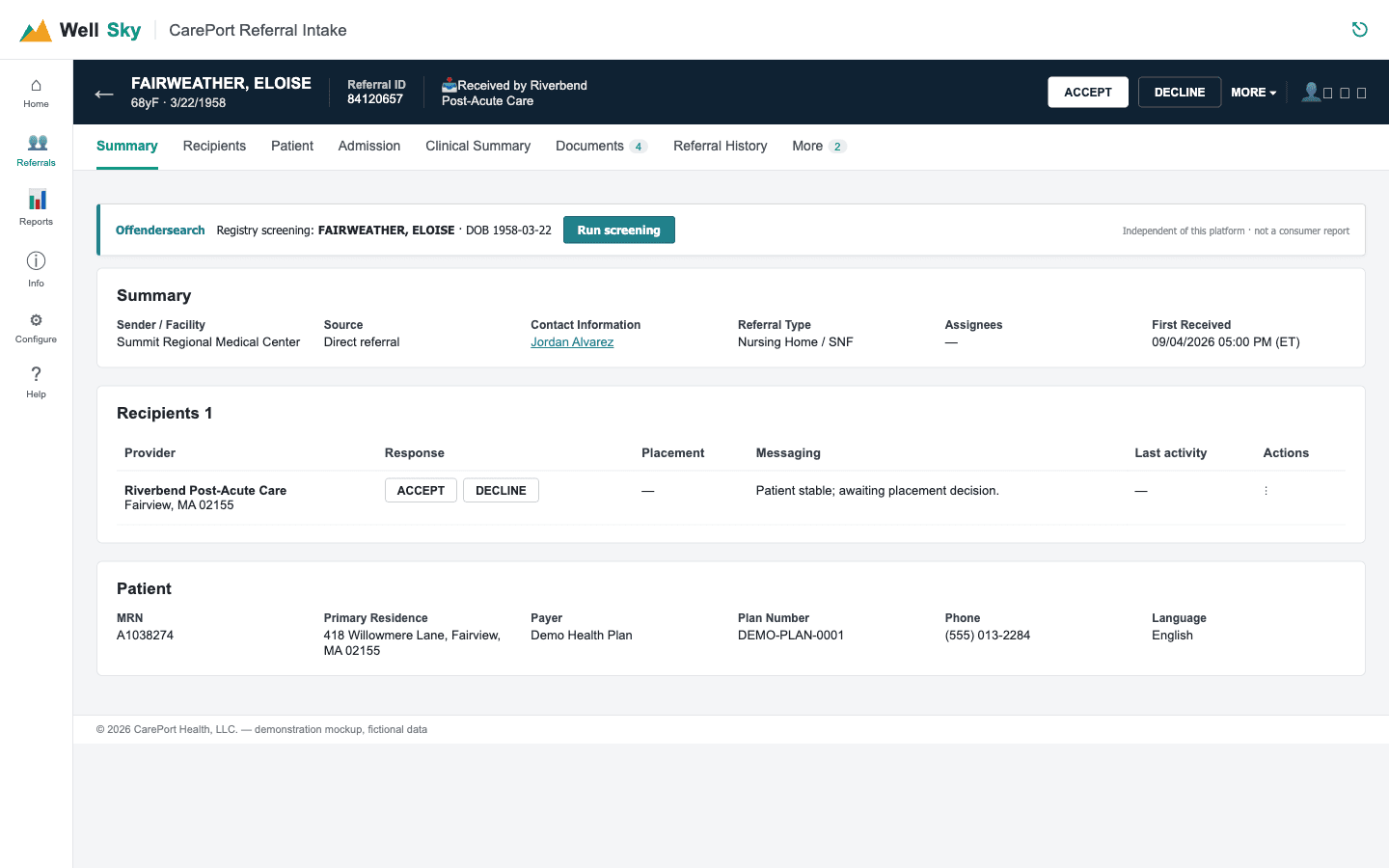
Illustration uses fictional demonstration data — no real patient.
Three clicks, inside the referral
1 · Open a referral
The panel appears in the patient header, already reading the name and date of birth on the referral.
2 · Run screening
One click searches 58 US sex-offender registries. Nothing runs automatically — you decide when to screen.
3 · See the result
A clear “no potential matches” or candidate cards to review — photograph, offense and the official record — right in place.
Full record cards — without leaving the referral
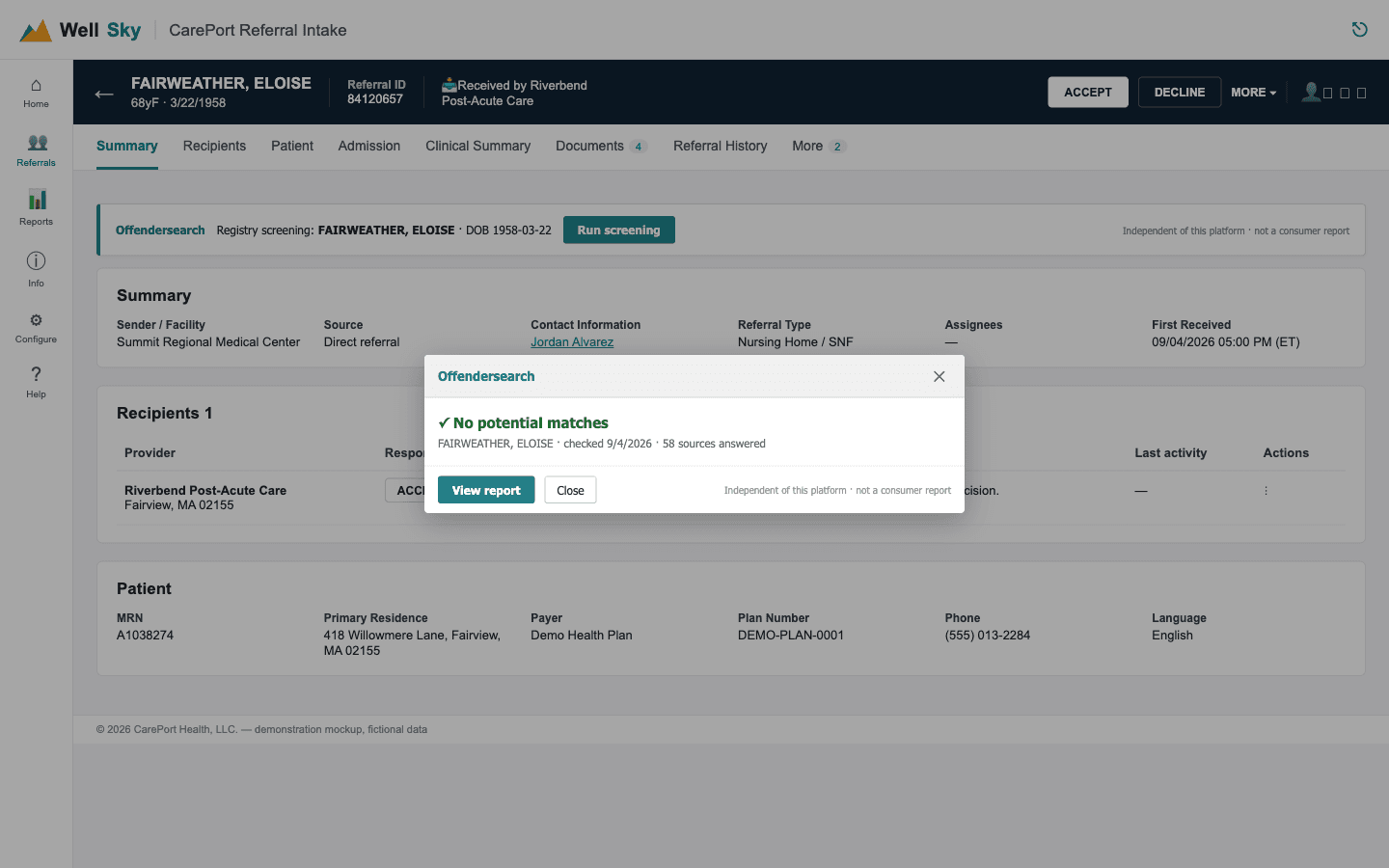
Illustration uses fictional demonstration data — no real patient.
The difference on a full intake day
| On each referral | Screening by hand | Offendersearch in CarePort |
|---|---|---|
| Where you work | Leave CarePort, open a separate registry site | ✓ Stays inside the referral |
| Typing the patient in | Retype name and date of birth by hand | ✓ Read straight from the referral |
| How many places you check | One state or site at a time | ✓ 58 US registries in one click |
| What you get back | A list to read and interpret yourself | ✓ Ranked candidate cards with photo, offense & official record |
| Already screened? | No way to tell at a glance | ✓ Remembers who your team already ran |
| IT project to start | — | ✓ None — install the extension and sign in |
CarePort, WellSky, ExtendedCare & Ensocare
CarePort
The current CarePort referral view — the panel seats itself in the patient header.
WellSky / ExtendedCare
The same platform family, including the older ExtendedCare “View Online Referral” layout.
Ensocare
Ensocare referral network — screening in the same one-click flow.
Aidin
Aidin admissions referrals — screening in the same one-click flow.
A BAA is signed first
The check uses a patient’s name and date of birth, which is protected health information. So a Business Associate Agreement is signed before your organization uses the extension — free, quick, and the same standard agreement any HIPAA-covered vendor provides. The extension sends only name, date of birth and state, never any other chart detail.
CarePort screening questions
Does CarePort or WellSky build or endorse this?
No. Offendersearch is an independent product and is not affiliated with or endorsed by CarePort, WellSky or ExtendedCare. The extension runs in your browser and adds a screening panel to referrals you already have open — the platform does not have to change anything, and nothing needs to be installed by their IT.
What information does it use?
Only the patient name, date of birth and state shown on the referral — the minimum needed to search the registries. It never sends a diagnosis, MRN, or any other chart detail, and it stores nothing on your computer beyond your sign-in.
Does it work with our version of CarePort?
Yes. It supports the current CarePort referral view and the older ExtendedCare / “View Online Referral” layout, plus Ensocare and Aidin. The panel finds the patient header on each and seats itself there.
Is a BAA required?
Yes. Because the check uses name and date of birth, a Business Associate Agreement is signed before your organization uses the extension. It is free and quick — the standard agreement any HIPAA-covered vendor provides.
Is this a background check for hiring?
No. It is a public-records registry screening for resident and referral safety, not a consumer report. It is not for FCRA-covered employment or tenancy decisions.
How do we roll it out to a whole facility or group?
Each coordinator installs the extension and signs in with your Offendersearch account — there is no server to stand up and no change to CarePort. For multi-facility groups we set up one account and one BAA that covers every building. Contact us and we will get the whole group live at once.
Offendersearch is an independent product and is not affiliated with or endorsed by CarePort, WellSky or ExtendedCare.
Screen your next referral without leaving CarePort
Start free with 25 searches, or talk to us about getting a whole facility group live under one account and one BAA.